RX Mode
- About Function
- Reference Manual Entry
RX Mode Action block
The RX Mode action block allows you to control which incoming MIDI messages are received and processed by the module.
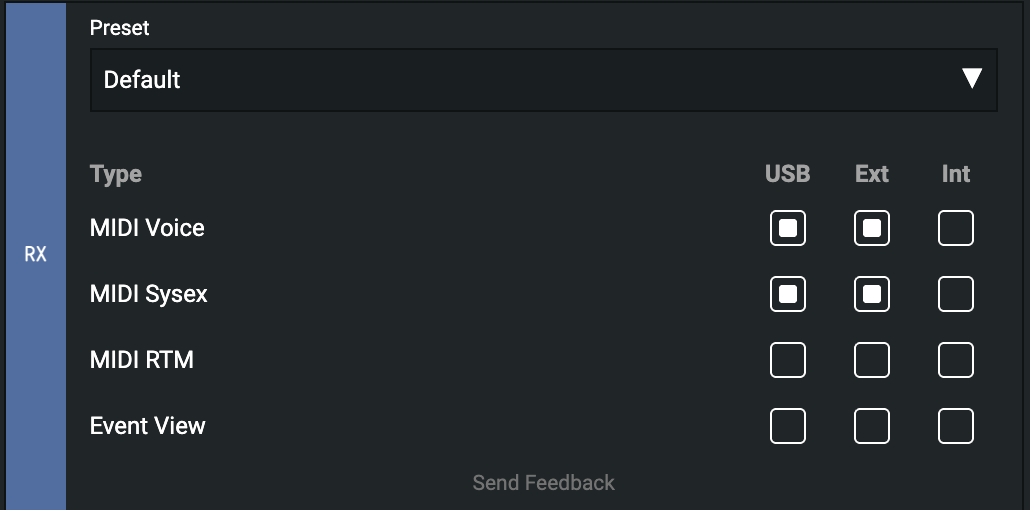
Message Types
MIDI Voice
Enabled by default.
Processes standard MIDI channel messages, including:
- Note On / Note Off
- Control Change (CC)
- Program Change
- Pitch Bend
- Aftertouch
MIDI SysEx
Enabled by default.
Processes System Exclusive (SysEx) messages used for device-specific communication and configuration.
MIDI RTM
Disabled by default.
Processes MIDI Real-Time Messages, including:
- Clock
- Start
- Continue
- Stop
Enable this option when MIDI synchronization or transport control is required.
Event View
** Enabled on VSN1 by default**
Displays incoming MIDI events in Event View for monitoring and debugging.
Input Sources
USB
Receives MIDI messages from the USB connection.
EXT
Receives MIDI messages from other connected modules.
INT
Receives MIDI messages generated by the module itself.
Recommended Settings
For most use cases involving incoming MIDI data, enable:
- USB
- EXT
This allows the module to receive MIDI messages from a computer, DAW, external controller, or other connected modules. The INT source is typically only needed when processing MIDI events generated by the module itself.
Use this block on the System Element>Setup
RX Mode
-
shortname: rxm
-
How:
rx_mode(type, source)-
type: integer, ranging 0...3
- 0 = MIDI Voice
- 1 = MIDI SysEx
- 2 = MIDI RTM
- 3 = Event View
-
source: integer, ranging 0...7
- 0 = Disabled
- 1 = USB
- 2 = Ext
- 3 = USB + Ext
- 4 = Int
- 5 = USB + Int
- 6 = Ext + Int
- 7 = USB + Ext + Int
-
-
What: Configures which input sources are enabled for a specific MIDI message type. This function can be used to control the RX Mode settings programmatically.
-
Example:
rx_mode(0, 1) -- MIDI Voice from USB
rx_mode(1, 2) -- MIDI SysEx from Ext
rx_mode(2, 3) -- MIDI RTM from USB and Ext
rx_mode(3, 6) -- Event View from Ext and Int