MIDI Auto Values
What are MIDI auto values?
Every Grid element sends MIDI automatically. This is the auto value system: a set of built-in functions that calculate the MIDI channel, command, and parameters based on the element's position on the module and the type of interaction (button press, encoder turn, etc.).
The defaults are designed so each element gets a unique MIDI message out of the box. But you can override any or all of them.
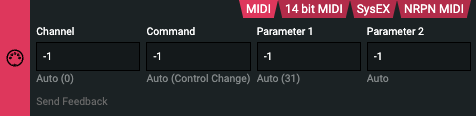
The four auto value functions
| Function | What it sets |
|---|---|
midi_auto_ch | MIDI channel (0–15) |
midi_auto_cmd | MIDI command byte (e.g. 144 = Note On, 176 = CC) |
midi_auto_p1 | Parameter 1 — note number or CC number |
midi_auto_p2 | Parameter 2 — velocity or CC value |
Default behavior
The defaults use the element's module position (module_position_x(), module_position_y()) and element index (self:element_index()) to spread messages across channels and note/CC numbers automatically.
-- Channel: derived from module Y position and current page
midi_auto_ch = function(self)
  return (module_position_y() * 4 + page_current()) % 16
end

-- Command: Note On (144) for buttons, CC (176) for everything else
midi_auto_cmd = function(self)
  if event_function_name() == "bc" then
    return 144
  else
    return 176
  end
end

-- P1: note/CC number, offset by module X position and element index
midi_auto_p1 = function(self)
  return (32 + module_position_x() * 16 + self:element_index()) % 128
end

-- P2: the actual value from the interaction
midi_auto_p2 = function(self)
  local event = event_function_name()
  if event == "bc" then return self:button_value()
  elseif event == "ec" then return self:encoder_value()
  elseif event == "epc" then return self:endless_value()
  elseif event == "pc" then return self:potmeter_value()
  else return 0 end
end
How to override auto values
Place overrides in the System element → Setup action. Any function you define there replaces the default. You only need to include the functions you want to change.
Example: Fixed channel, notes/CC starting from 0 or 6
Send everything on channel 1, with note/CC numbers starting at 0 and counting up by element index:
-- MIDI channel 1 (0-indexed: channel 1 = value 0)
midi_auto_ch = function(self)
  return 0
end

-- Notes/CCs start at 0, one per element
midi_auto_p1 = function(self)
  return self:element_index() % 128
end


-- Notes/CCs start at 6, one per element
-- element 0 → CC 6, element 1 → CC 7, element 2 → CC 8, ...
midi_auto_p1 = function(self)
  return (6 + self:element_index()) % 128
end
Element 0 → note/CC 0, element 1 → note/CC 1, and so on.
Where to put this code
- Open Grid Editor
- Disable Minimalist mode in the top-right corner — this reveals the Setup action
- Open the Element Dropdown and select the System element
- Paste your overrides into the Setup action
Changes apply globally to all elements on that module.